Email safety
I Tapped the Link. Now What?
It happened. The email looked real, you tapped, and now something about it feels wrong. Maybe the page asked for more than it should have. Maybe you typed something before you thought about it. Maybe you are just not sure.
Quick version: Tapping a link is not the disaster. What you did on the page after is what matters. If you only looked, close it and you are fine. If you typed a password, change it now from the real app. If you typed a card number, call your bank. If you downloaded something, uninstall it. Then tell someone.
First: this is fixable. Second: it is not a sign that you are bad with technology. The email was built by professionals whose entire job is to get careful people to tap. In 2025, adults over 60 filed more than 201,000 fraud complaints with the FBI. You are in very large company.
Here is what to do, sorted by what actually happened after you tapped.
Step 1: Figure out which of these you did
Be honest with yourself, because the answer changes what comes next.
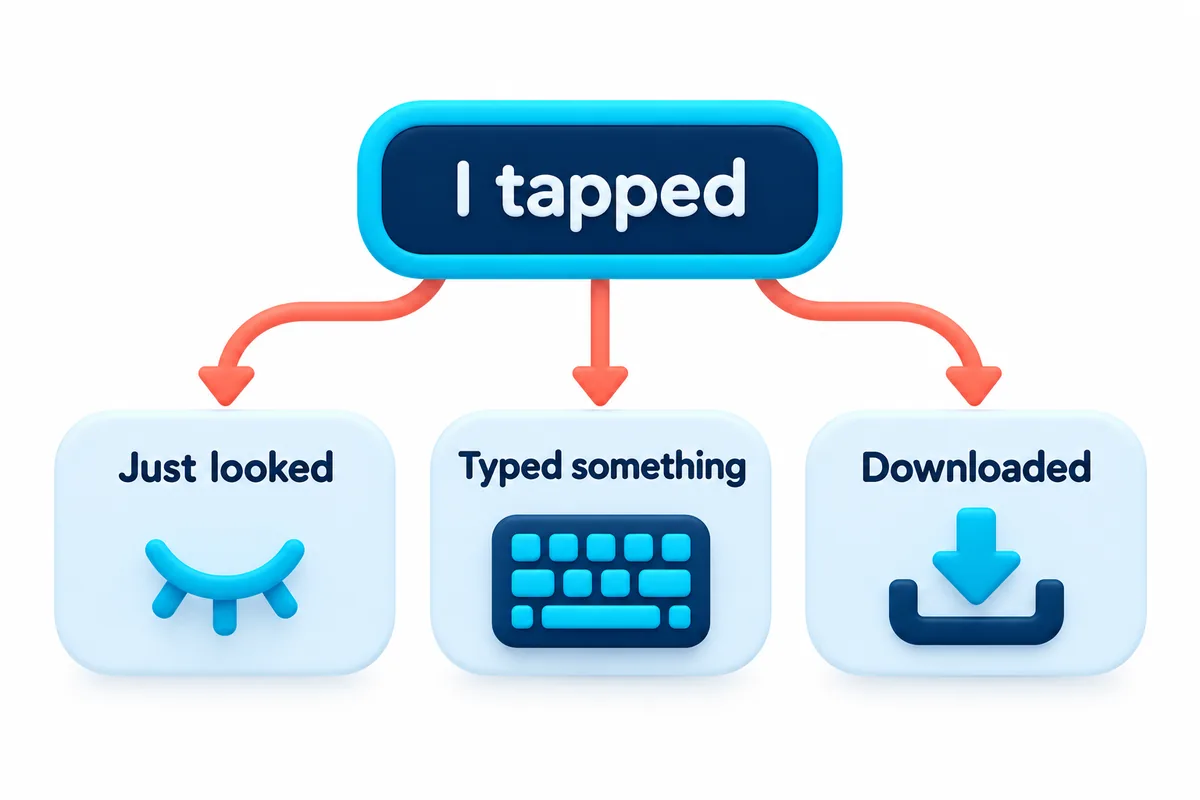
- A. I tapped, a page opened, I looked and closed it. Nothing typed, nothing downloaded.
- B. I typed something. A password, a Medicare number, a card number, my address, anything.
- C. I downloaded or installed something. The page said to install an app, update something, or “click to view.”
- D. I’m not sure.
If you are D, treat yourself as B and C both. It costs you twenty extra minutes and nothing else.
If A: you looked and closed it
On a modern Android phone, simply opening a web page does not install anything or give the page access to your phone. You are fine.
Two small things to do anyway:
- Delete the email so you do not tap it again later.
- Report it: forward it to reportphishing@apwg.org first, then delete. The FTC recommends that address for phishing emails, and it helps get the link shut down.
Done.
If B: you typed something
What you do depends on what you typed. Do these in order; the first one is the most urgent.
A password.
- Open the real app or type the real website address yourself (never from the email).
- Change the password.
- If you use that same password anywhere else, change it there too. This is the one that people skip and it is the one that matters most. Scammers try a stolen password on your email, your bank, and Amazon within the hour.
A card or bank number.
- Call the number on the back of the card.
- Say: “I entered my card number on a website that I think was a scam.” They hear this every day. They will cancel the card and send a new one. You are not liable for charges you report promptly.
Your Medicare number.
- Call 1-800-MEDICARE (1-800-633-4227).
- Tell them what happened. They will flag your number and watch for fraudulent claims.
Your Social Security number.
- Go to IdentityTheft.gov. The FTC built it for exactly this, and it gives you a personalized recovery plan based on what was taken.
- Consider a credit freeze with the three bureaus. It is free and it stops anyone from opening accounts in your name.
Your email password specifically. This one is the most serious, because your email is where every other password reset goes. Change it first, before anything else. Then check your email settings for anything you did not set up: forwarding rules, recovery addresses you do not recognize. Scammers add those so they keep getting your mail after you change the password.
If C: you downloaded or installed something
- Turn on Airplane mode. This stops whatever it is from sending anything while you deal with it.
- Go to Settings, then Apps. Sort by recently installed if you can. Uninstall anything from today that you do not recognize.
- Open the Google Play Store, tap your profile picture, tap Play Protect, tap Scan. It checks every app on the phone.
- Turn Airplane mode off.
- Now do the password steps from section B, because a malicious app may have watched you type.
If you cannot find the app, or the phone is behaving strangely (pop-ups, apps opening on their own, the battery draining fast), take it to your carrier’s store. They see this regularly and can reset it.
Step 2: Tell someone
This is a real step, not a feel-good one. Scammers rely on embarrassment. A person who tells their daughter or their neighbor that afternoon gets help closing the gaps. A person who keeps quiet often gets a follow-up call a week later from the same scammer, now pretending to be the bank “helping” with the fraud.
Tell one person. Today.
Step 3: Watch for the second act
For the next month, expect follow-ups. A call from “your bank’s fraud department.” An email from “Medicare” about suspicious activity on your account. A text saying your package is held. They know you tapped once, so they try again with a different story.
Same rule as always: hang up, close it, and contact the real organization yourself using the number on your card or statement.
How Easy Mail fits in
Easy Mail cannot undo a tap, but it can make the next one less likely. With Gmail, Yahoo, and Outlook in one inbox, you can build one habit of tapping the sender’s name to check the address and use it everywhere. And one-tap cleanup clears the promotional and junk mail that scam emails hide in, so the suspicious ones stand out.
Get Easy Mail Email Launcher on Google Play.
Frequently asked questions
I tapped the link but the page didn’t load. Am I okay?
Almost certainly. A page that did not load could not collect anything. Delete the email and move on.
Should I factory reset my phone?
Only if you installed something and cannot remove it, or the phone is acting strangely after the steps above. For most people who just tapped a link, a reset is far more disruption than the situation calls for.
I’m too embarrassed to call my bank. Can I just watch my statement?
Please call. Banks have entire departments for this and the person answering has heard it a hundred times this week. Watching your statement means finding the charge after it happens. Calling means the charge never happens.