
Inbox cleanup on Android
How to Mass Delete Emails Without Spending Your Whole Weekend
That unread count did not grow overnight. Promos, old newsletters, shipping updates, and messages you meant to archive months ago all stacked up while you were busy with everything else. If you have been searching for how to mass delete emails without tapping one message at a time, you are looking for a faster path to a clean inbox, not another chore.
The good news is you do not need to delete messages one by one. With the right tools on your Android phone, you can clear large batches in seconds, stop repeat spam senders, and free up storage without losing the folders and labels you already rely on. Here is a practical guide, including how Easy Mail Email Launcher and its Inbox Zero tools handle the heavy lifting.
Ready to wipe thousands of promos and spam in seconds? Easy Mail Inbox Zero bulk delete works with one swipe from your home screen.
Why People Search for How to Mass Delete Emails
Most mail apps were built for reading one message at a time, not clearing a backlog of hundreds or thousands. Deleting emails individually feels fine when you have five to remove. It breaks down fast when your inbox holds years of unread promos, expired coupons, and automated alerts you never opened.
Mass deletion solves three problems at once. You get mental space back when the unread number stops staring at you. You recover phone storage that old attachments quietly consumed. And you make room for mail that actually matters, from family, work, or accounts you still use daily.
What Should You Look for Before You Mass Delete Emails?
Not every cleanup method is worth the risk. Before you wipe a large batch, check that your approach does these three things well.
Does it handle large batches quickly?
If you still have to confirm each message separately, you are not really mass deleting. Look for multi-select, swipe actions, or dedicated bulk tools that move hundreds or thousands of messages in one pass.
Does it keep your folders and labels?
A big clear-out should not force you to rebuild your filing system. Your existing labels, folders, and organization should stay intact while the junk pile shrinks.
Does it help stop junk from coming back?
Deleting today’s spam is only half the job. Blocking repeat senders keeps the same promos and junk lists from refilling your inbox next week.
How to Mass Delete Emails on Android With Easy Mail
Easy Mail Email Launcher is an Android home screen app that puts your inboxes one swipe away. Its Inbox Zero suite is built specifically for the moment your unread count looks impossible. According to Easy Mail’s Inbox Zero page, the tools wipe thousands of promos and spam in seconds, block unwanted senders, and free up device storage while keeping your current labels and folders.
Select multiple messages at once
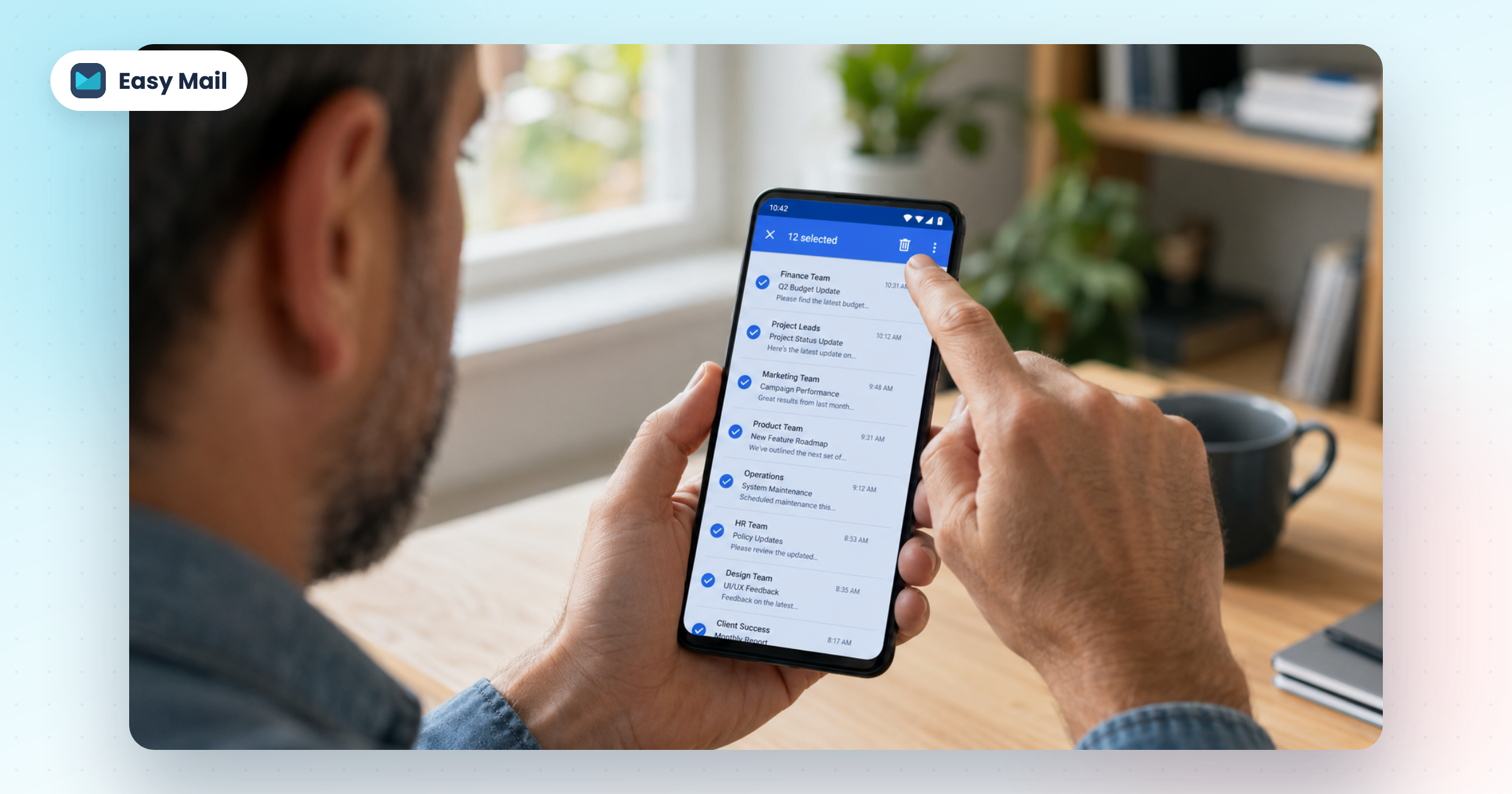
Open your inbox in Easy Mail and select the messages you want gone. Tap the checkmarks beside individual emails, or use selection tools to grab a whole run of similar messages. When several are highlighted, the app shows how many you have selected so you know the batch size before you commit.
Delete the batch with one action
With your selection ready, tap the trash icon in the top bar. That single action removes the whole group instead of making you repeat the same tap for every line item. For large backlogs of unread promos and old alerts, this is the difference between a five-minute cleanup and an afternoon lost to busywork.
Use the right swipe for Inbox Zero cleanup
Easy Mail also supports clearing unread mail with a right swipe through Inbox Zero. That gesture is aimed at people who want to bulk-delete thousands of unread emails fast, especially when most of the pile is junk you never planned to read anyway.
Easy Mail keeps your current labels and folders during cleanup. You are clearing clutter, not starting over with a blank filing system.
Step-by-Step: Mass Delete Emails on Your Android Phone
If you want a clear starting path, follow these steps inside Easy Mail Email Launcher.
- Install Easy Mail from Google Play and set it as your home screen launcher when prompted
- Swipe right from your home screen to open your unified inbox
- Add your Gmail, Yahoo, Outlook, or other accounts with the “+” button if you have not already
- Scroll to the messages you want to remove, or filter toward older promos and unread clutter
- Select multiple emails using the checkmarks, or use Inbox Zero’s right-swipe action for bulk unread cleanup
- Tap the trash icon to delete the selected batch in one move
- Block repeat spam senders so the same junk is less likely to return
Most people notice a visible drop in unread mail within the first session. The goal is not perfection on day one. It is removing enough noise that checking email feels normal again.
How do you Block Spam Senders So Junk Stays Gone?
Mass delete solves the pile sitting in front of you. Blocking senders protects the inbox you have left. Easy Mail’s Inbox Zero tools let you block unwanted senders so repeat promos and junk lists are less likely to refill your screen after you clean up.
That pairing matters. Delete once without blocking, and the same retailers and mailing lists often show up again within days. Delete and block, and your inbox stays closer to empty with less daily maintenance.
How does Cleaning Your Inbox Free Up Storage?
Old email is not just visual clutter. Attachments, images, and long message threads take up space on your phone over time. Easy Mail’s Inbox Zero tools are designed to clear storage space as you remove large batches, which helps if your device has been warning you about low storage.
You do not need to understand every technical detail. Remove the mail you do not need, and the space it occupied goes with it.
When does Mass Delete Makes Sense (and When Should you Pause?)
Mass delete is the right call for promos, expired deals, old shipping notices, and newsletters you never read. It is also a strong fit for unread piles where you already know nothing in the batch needs a reply.
Pause before bulk deleting if you are unsure whether a message holds a receipt, travel info, or something tied to an active account. Scan the selection once, then proceed. Easy Mail does not wipe your folder structure, but deleted mail is still deleted. A quick glance beats regret later.
You Might Also Want to Know
Can I mass delete emails without losing my folders?
Yes. Easy Mail keeps your current labels and folders while you bulk delete. The cleanup targets the messages you select, not the organization system behind them.
How many emails can I delete at once?
Easy Mail is built to handle large batches. The Inbox Zero tools are designed to clear thousands of promos and spam in seconds, not one message at a time.
Does mass delete work with Gmail, Yahoo, and Outlook?
Easy Mail supports popular providers including Gmail, Yahoo, and Outlook. Add each account inside the app, then use the same bulk delete and Inbox Zero tools across your inboxes.
What is the fastest way to reach inbox zero on Android?
Combine bulk delete with spam blocking. Clear the existing pile with multi-select or a right swipe, then block repeat senders so junk is less likely to stack up again. Easy Mail puts both tools in the same app you already open from your home screen.
Is Easy Mail safe for managing multiple email accounts?
Easy Mail connects through the standard login processes your email providers support on Android. The app is trusted by over one million users. As with any mail app, review the privacy policy and permissions before you connect your accounts.
Take Back Your Inbox Starting Today
Learning how to mass delete emails is really about reclaiming time and attention. You do not need to live with a four-digit unread count or spend hours tapping delete on messages you never wanted in the first place.
With Easy Mail Email Launcher and Inbox Zero, you can bulk delete thousands of messages, block spam senders, and free up storage without rebuilding your folders from scratch. Swipe right from your home screen, select the clutter, and move on with your day. Want to learn more? Check our other helpful about deleting emails!
Install Easy Mail on Google Play and clear your inbox with Inbox Zero bulk delete tools.
