
Email safety
How to Tell If an Email Is a Scam: 7 Checks That Take 10 Seconds
You open your email and there it is. Your account will be closed. A package could not be delivered. Someone charged your card. Tap here to fix it.
Quick version: Real companies do not rush you, do not ask you to fix a problem by tapping a link in the email, and do not want gift cards. If an email does any of those three things, stop. The seven checks below take about ten seconds and work on any Android phone in any email app.
Your stomach drops a little. That is the point. The email was written to make you feel that way, because a worried person taps first and thinks later.
Here is the thing nobody tells you: the phone makes this harder than it should be. On a small screen, the sender’s real address is hidden behind a friendly name, links are hidden behind blue text, and the Reply and Delete buttons sit right next to each other. None of that is your fault. It is a design problem, and you can work around it.
Who is actually being targeted
This is not a “some people fall for it” situation. In 2025, adults 60 and older filed more than 201,000 scam complaints with the FBI and reported $7.7 billion in losses, a 59 percent jump in one year, according to the FBI’s 2025 Internet Crime Report. Phishing and spoofing, meaning fake emails and texts pretending to be someone you trust, was the single most reported crime type at 191,561 complaints.
We read through the report and the National Council on Aging’s phishing guide before writing this, and every check below comes from a pattern that shows up in those complaints over and over.
The 7 checks
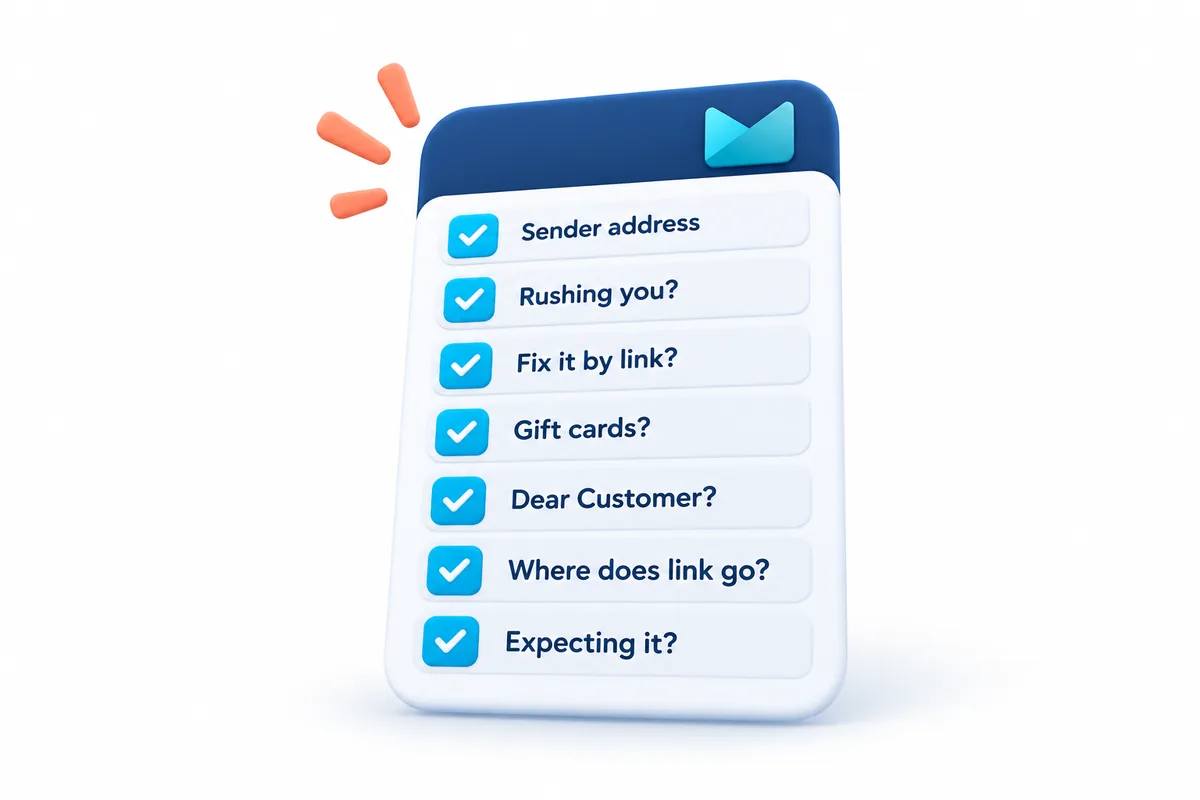
You do not need to do all seven every time. Usually one or two is enough.
1. Tap the sender’s name and look at the actual address
The name says “Amazon” or “Chase” or “Medicare.” The name is just a label. Anyone can type anything there.
On Android, tap the sender’s name at the top of the email. A small card opens showing the real email address. Look at what comes after the @ sign.
- amazon.com is Amazon.
- amazon-support-center.co or amaz0n.com is not.
- Anything ending in gmail.com, outlook.com, or yahoo.com is a personal account, not a company.
If the address looks wrong, you are done. It is a scam. Delete it.
2. Is it rushing you?
“Within 24 hours.” “Immediately.” “Your account will be suspended tonight.”
Real companies send reminders. Scammers send deadlines. Urgency is the tool they use to stop you from doing check number 1.
3. Does it want you to fix a problem by tapping a link?
This is the big one. A real bank, a real delivery company, and a real government office will never send an email that says “tap here to verify your account” or “tap here to update your payment.”
If you think the problem might be real, do not use the link in the email. Close the email, open the company’s own app, or type their web address into your browser yourself, and log in there. If there is a real problem, it will be waiting for you inside your account.
4. Does it ask for money in a strange way?
Gift cards. Wire transfers. Cryptocurrency. Cash in the mail. A payment app you have never used.
No legitimate business or government agency takes payment in gift cards. Not the IRS, not Medicare, not your electric company. If an email mentions gift cards as a way to pay, it is a scam every single time.
5. Look at the greeting and the wording
“Dear Customer.” “Dear Valued Member.” “Hello Sir/Madam.”
A company you have an account with knows your name. Scammers send the same email to millions of people, so they cannot use yours.
Also watch for wording that reads slightly off. Odd capitalization, sentences that do not quite make sense, a mix of fonts. Scam emails written by AI have gotten better at this, so a clean email is not proof that it is real. A sloppy one is a strong sign that it is fake.
6. Long-press the link before you tap it
On Android, if you press and hold on a link (do not tap, just hold), a small box appears showing where the link actually goes. The words on the screen might say “www.chase.com” while the real address underneath is something completely different.
If the real address does not match the company, or is a long string of random letters, do not tap it.
7. Ask yourself: was I expecting this?
Did you order a package? Did you sign up for this service? Did you enter a contest?
If the answer is no, the email is almost certainly a scam, no matter how official it looks. You cannot win a prize you did not enter, and a package you did not order cannot be stuck at customs.
What to do with a scam email
Do not reply. Do not tap “unsubscribe” inside the email. Both of those tell the scammer your address is live and someone reads it.
Just delete it. If you want to help, forward it first to reportphishing@apwg.org, or report it at reportfraud.ftc.gov. If you or someone you know has already lost money, the National Elder Fraud Hotline is 1-833-372-8311.
If you already tapped the link
It happens. Here is the order to do things in.
- If you typed a password on the page it took you to, change that password now, from the company’s real app or website.
- If you entered a card number, call the number on the back of your card and tell them.
- If you downloaded anything, uninstall it. Go to Settings, then Apps, and remove anything you do not recognize that appeared today.
- Tell someone. A family member, a friend, anyone. Scammers count on embarrassment to keep people quiet.
How Easy Mail fits in
Easy Mail Email Launcher puts your Gmail, Yahoo, and Outlook inboxes on one home screen, which means every email you get comes through one place with the same layout. Once you know where to tap for the sender’s address, it works the same way for every account. And the one-tap cleanup clears out promotional and junk mail in bulk, so the scam emails are not sitting in a pile with the real ones.
It will not catch every scam for you. Nothing will. But fewer inboxes to check means fewer places for a fake email to hide. If you want to see what else it does, the Easy Mail FAQ covers the basics, and our guide to notification options on Android helps keep the phone from interrupting you with junk in the first place.
Fewer inboxes, fewer places for a scam to hide. Get Easy Mail Email Launcher on Google Play.
Frequently asked questions
Can I get a virus just by opening a scam email?
On a modern Android phone, opening and reading an email is safe. The danger is in tapping links, downloading attachments, or typing your information into the page a link takes you to. Reading it and deleting it will not hurt anything.
The email has my name and part of my card number. Doesn’t that mean it’s real?
Not anymore. Scammers buy lists that include names, addresses, and sometimes the last four digits of a card from earlier data breaches. Use checks 1, 3, and 6 instead of trusting the personal details.
Why do I keep getting these?
Your email address is on a list somewhere, probably from a breach at a company you did business with years ago. There is no way to get off the list, but you can stop the emails from reaching your inbox. Our guide to cleaning up your Gmail inbox shows how to filter them out.
Sources: FBI 2025 Internet Crime Report (IC3) · NCOA: Phishing Scams Explained · FTC: reportfraud.ftc.gov
